Are you an existing client?
If you already have an account, or create an account later, this Demo Trading Account will not show in your Client Area.
What is a demo trading account?
A CFD trading demo account is a simulated trading environment that allows traders to practise trading CFDs using virtual funds under real market conditions.
If you are a beginner who wants to practise and easily migrate to a live account, or a more advanced trader who is looking to test a strategy and check the stability and execution of a trading platform, a demo account is a great introduction to a broker.
Open free demo accountPractise trading CFDs using virtual funds
Experience real-time market conditions without risking capital
Learn how trading platforms like MT4 and MT5 work
Test strategies, indicators, and Expert Advisors (EAs)
Build confidence before transitioning to live trading
Benefits of using a demo trading account for CFDs
Starting with a demo trading account removes the risk of losing money while you learn. You can place trades, make mistakes and understand market mechanics without worrying about your capital.
Opening positions, setting stop losses, adjusting take profits, and closing trades become second nature before you risk actual funds. Demo trading also reveals your trading psychology in a forgiving environment where recognising these patterns costs nothing but time.
Trade in a risk-free simulated environment
Improve trading discipline and market understanding
Test new strategies before using real money
Learn risk management and position sizing techniques
Keep a trading journal to track performance and mistakes
Backtesting
Demo accounts are particularly valuable for backtesting automated strategies and Expert Advisors (EAs). Run your algorithm through historical market data, identify bugs in your code, and optimise parameters before deploying in live conditions.
While demo results won't perfectly mirror live performance (execution speeds may differ, slippage won’t occur, market liquidity won’t be fully represented, etc.), you'll catch major logic errors and refine your approach substantially.
Test, validate & optimise
Experienced traders use demo accounts to test trading strategies in real market conditions and improve risk management skills.
You can test new technical setups, validate fundamental analysis approaches, or optimise entry and exit rules across different market conditions without putting capital at risk.
Risk management skills
Treat your demo account like real money. Use position sizes you'd actually trade with, implement proper risk management (1-2% capital committed per trade), and maintain a trading journal to cultivate a sustainable approach to trading.
Demo vs real trading
You might execute your strategy flawlessly in demo conditions, then struggle applying the same mindset when actual capital is involved.
Use your demo experience to build skills and test strategies but recognise that psychological preparation is a separate challenge you'll face during the transition to live trading.
Why choose Tickmill's demo account?
Opening a demo account with Tickmill means accessing the same professional infrastructure that powers our live trading environment. Instead of practising on a simplified simulation, you're experiencing the platforms, instruments and interface you’ll experience when you trade for real.
Access MT4, MT5, WebTrader, and mobile trading platforms
Practise trading CFDs on forex, indices and commodities
Experience trading conditions designed to reflect live markets
Test demo with a regulated broker trusted globally
Broad market access
Your demo account unlocks 600+ instruments across five asset classes. Trade 60+ forex pairs from major pairs through minors and exotics. Access global stock indices, as well as leading equities, energy and metal commodities, and major cryptocurrency pairs.
Trusted broker
Tickmill is a globally regulated broker operating across multiple jurisdictions, with more than a decade of industry experience. The company has earned more than 60 trading awards, recognising its reputation as a reliable CFD broker.
Institutional-grade trading conditions
Our demo accounts replicate the spreads and execution quality you'll experience under live trading conditions. You'll see realistic order fills, minimal slippage simulation, and transparent pricing without hidden markup.
Advanced trading platforms
Choose between MetaTrader 4, MetaTrader 5, or our browser-based WebTrader. MT4 delivers the industry-standard platform trusted by millions, with full Expert Advisor support. MT5 offers more sophisticated trading with advanced charting and additional order types. WebTrader runs directly in your browser with full functionality across desktop and mobile devices.
Every platform connects to the same market feeds and execution infrastructure as our live accounts.
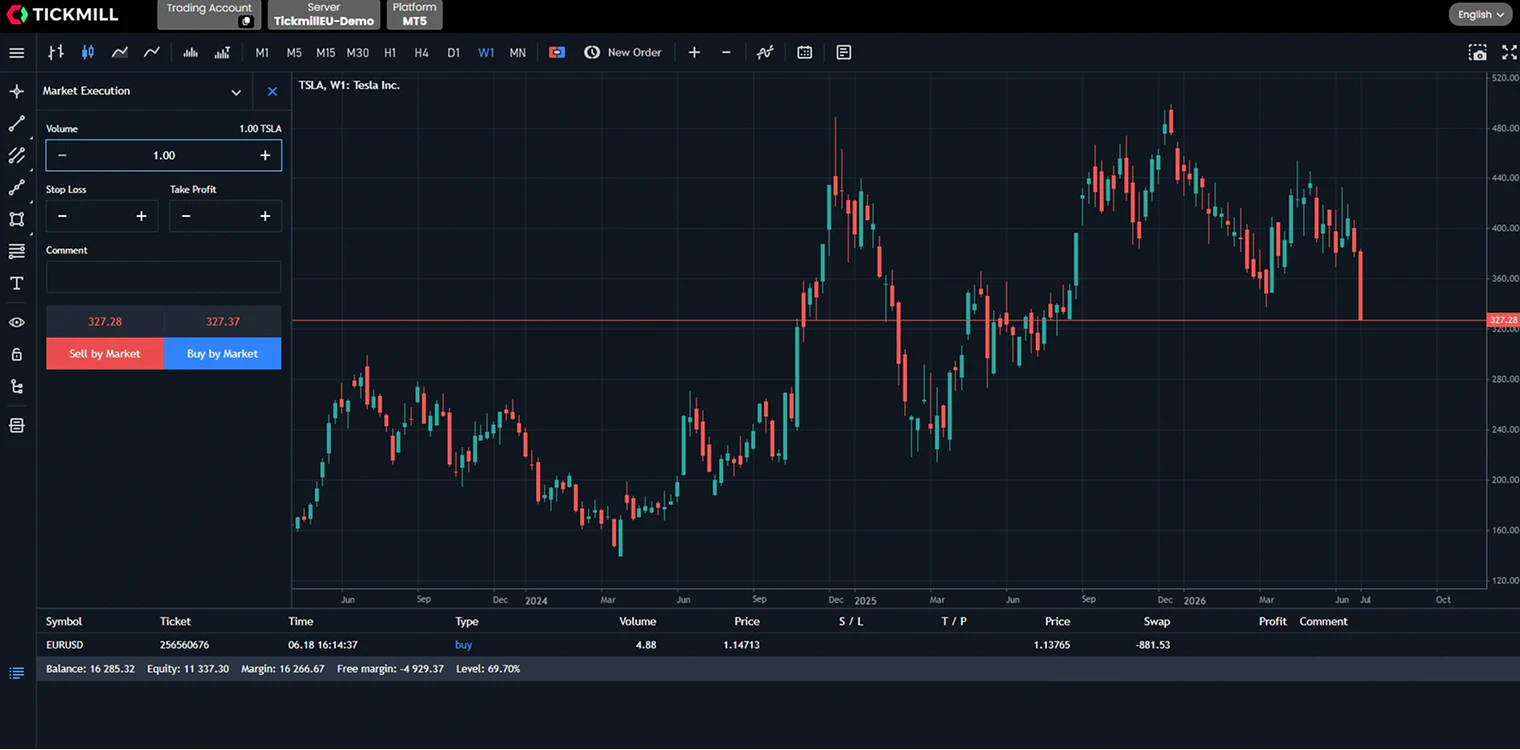
How to open a demo account with Tickmill
Opening a demo trading account with Tickmill takes less than 3 minutes. The process is designed to get you trading quickly.
1
Start your registration
Click the registration button and provide your personal details. You'll choose your preferred demo account settings, including account type, leverage level, and platform.
2
Receive your login credentials
Your demo account credentials arrive via email within seconds. This includes your account number, password, and server connection details specific to your chosen platform.
3
Download and install your platform
If you selected MetaTrader 4 or 5, download the installation file from the link in your emailMobile traders can download the MT4/MT5 apps directly from the App Store or Google Play.
WebTrader users can skip this step and start trading immediately in their browser.
4
Connect to the Demo server
Open your MetaTrader platform and navigate to File > Login to Trade Account. Enter your account number and password, then select the Tickmill demo server from the server list to establish a connection.
5
Start trading risk-free
Place your first practice trade, test different order types, experiment with indicators, or load an Expert Advisor.
Already a Tickmill client?
If you have a verified live account, creating additional demo accounts takes seconds through your Client Area. Log in, navigate to the demo account section, and generate new credentials instantly. You can maintain up to 7 demo accounts per registered email address.
Demo vs. live trading account: understanding the differences
| Demo Account | Live Account | |
|---|---|---|
| Funds | Virtual | Real |
| Emotional Pressure | Low | High |
| Risk | None | Capital at risk |
| Market Conditions | Simulated | Real |
| Strategy Testing | Ideal | Limited |
Who should use a demo account?
A demo account isn't just for beginners. From beginner traders to algorithmic traders, scalpers, swing traders, EA users and experienced traders testing strategies, a forex demo account can serve distinct purposes across different experience levels.
Beginner forex traders building a strong foundation
If you're new to CFD trading, a demo account is your starting point. You'll learn how to navigate MetaTrader platforms, place different order types (market, limit, stop), and understand how position sizing affects your account balance.
Algorithmic traders
Algorithmic traders can use demo accounts to develop, test and refine automated trading strategies in a risk-free environment. Demo trading helps evaluate execution quality, strategy performance across different market conditions, and the impact of factors such as spreads and latency before deploying algorithms on a live account.
Scalpers
Scalpers can use demo accounts to practise high-frequency trading strategies in fast-moving market conditions without financial risk. It also helps them evaluate spreads, execution speed and order timing, which are critical factors for short-term trading success.
Swing traders
Swing traders can use demo accounts to test medium-term strategies across different market trends and volatility conditions. A demo environment also allows them to refine entry and exit timing, risk management and trade planning before committing real capital.
EA developers and users
EA developers and users can use demo accounts to build, optimise and safely test Expert Advisors (EAs) before live deployment. A demo environment allows them to debug coding issues, fine-tune parameters, and verify that automated systems execute trades correctly across different timeframes and instruments.
Experienced traders testing strategies
You've been trading for years, but you've developed a new approach or want to adapt your strategy to different market conditions. Demo accounts let you backtest and forward-test new methodologies across various instruments without disrupting your live trading capital.
Best practices for effective demo trading
Demo accounts offer zero financial risk, but they're most valuable if you use them like a professional. The habits you build in demo trading carry over to live markets, both good and bad.
Treat demo capital seriously and use realistic risk rules.
Risk 1–2% per trade and always use stop-losses.
Journal your trades by tracking decisions, emotions, and results.
Stick to one strategy and test it across 30–50 trades.
Avoid overtrading and only take setups that match your plan.
Trade like it’s a real account
The biggest mistake traders make? Treating demo funds as fake money. If you wouldn't risk 50% of your account on a single trade with real money, don't do it in demo. Use the same position sizes, risk percentages, and stop-loss distances you'd apply with actual capital. This builds muscle memory for disciplined execution when stakes become real.
Practice proper position sizing
Set a risk limit per trade (1-2% of account balance is standard) and stick to it. Place stop losses on every position. Calculate position sizes based on your risk tolerance, not arbitrary lot numbers. Risk management isn't something you "add later" when trading live, but it must become automatic through consistent demo practice.
Keep a detailed trading journal
Document every trade: entry reason, exit reason, market conditions, emotional state, and outcome. This creates a feedback loop that accelerates learning. Review your journal weekly to identify patterns: both winning setups and recurring mistakes. Traders who journal consistently cut their learning curve significantly.
Test one strategy at a time
Avoid strategy hopping. Pick a single approach (trend following, breakout trading, whatever resonates with your personality) and test it thoroughly across different market conditions. You need at least 30-50 trades to evaluate a strategy's validity. Jumping between methods after a few losses teaches you nothing except how to lose consistently.
Avoid overtrading
Just because you can trade 24/5 doesn't mean you should. Trade only when your strategy's conditions are met. If your setup requires specific market conditions that occur twice a day, take two trades, not twenty. Overtrading in demo creates unrealistic expectations about trade frequency and degrades decision quality when you transition to live markets.
Ready to trade live?
Open your accountStart your trading
journey with confidence
Opening a demo account is your first step toward mastering the markets. Whether you're building foundational skills, refining advanced strategies, or evaluating Tickmill's execution quality, a risk-free practice environment gives you the space to develop without financial pressure.
Ready to experience real market conditions with virtual funds? Your demo account is waiting.
Want to accelerate your learning?
Explore our trading education hub for market analysis, strategy guides, and expert insights that complement your hands-on practice.
Frequently Asked Questions
A demo account is a risk-free trading environment that simulates real market conditions using virtual funds. It provides access to live market prices, trading platforms (MT4/MT5), and the full range of instruments available on live accounts, allowing you to practise trading without financial risk.
Yes. Tickmill's demo account is completely free with no hidden fees, subscription charges, or obligations. You can practise trading across 600+ instruments with virtual funds for as long as your account remains active through regular logins.
Your demo account remains active as long as you log in at least once every 7 days using your Master password. Accounts with no login activity for 7 consecutive days will automatically expire. You can open a new demo account anytime if your previous account expires.
Demo accounts expire after 7 days of inactivity on both MT4 and MT5 platforms. To keep your account active, simply log in using your Master password from your trading terminal at least once per week. Logins using Investor passwords do not count toward account activity.
Absolutely. Tickmill's demo account provides virtual funds that function exactly like real capital for trading purposes. You can execute trades, test strategies, and experience market conditions across forex, indices, commodities, bonds, and cryptocurrencies without risking your own money.
You can also add more funds to your existing active Demo accounts directly through your Client Area if your Demo account was created there, but also by contacting our Customer Support team via email for accounts created through the website.
Tickmill offers demo accounts for MetaTrader 4, MetaTrader 5, and WebTrader platforms. MT4 and MT5 require software downloads, while WebTrader runs directly in your browser without installation. All platforms provide full functionality including charting tools, indicators, and Expert Advisor support.
Demo accounts use real-time market prices and spreads identical to live trading conditions. However, execution characteristics may differ slightly under extreme volatility, and the psychological pressure of trading real money cannot be replicated. Demo trading provides realistic practice for mechanics and strategy testing, but emotional discipline develops only through live trading experience.
The fundamental difference is capital type: demo accounts use virtual funds with zero financial risk, while live accounts involve real money and actual profit or loss. Live trading introduces emotional pressure, psychological stress, and potential slippage during volatile markets that demo environments cannot fully simulate. Demo accounts serve as practice tools; live accounts are where trading skill translates to financial outcomes.
Demo accounts are essential for beginners. They provide a safe environment to learn platform navigation, understand order types, practise position sizing and develop basic risk management habits before committing real capital. Most successful traders start with demo accounts to build foundational skills and confidence.
Transition to live trading when you demonstrate consistent profitability over at least 3 months, maintain disciplined risk management (stop losses, position sizing), and feel emotionally prepared for real financial outcomes. Start with a smaller live account than your demo balance, use conservative position sizes, and gradually scale as you adapt to the psychological differences.
The best demo account provides real market conditions, professional trading platforms, comprehensive instrument access, and no artificial limitations. Tickmill's demo account offers MT4/MT5 platforms, 600+ instruments across 6 asset classes, spreads from 0.0 pips, and no time pressure beyond the 7-day activity requirement. The account that best matches live trading conditions prepares you most effectively.
What experts have
written about demo accounts
“
“We highly recommend that you open a demonstration account and promise yourself that you consistently can show a profit in the demo account. When you get to that point of consistency, you will have shown a level of patience and discipline that can pay handsome dividends not just in trading but in life.”
Jay Norris
Al Gaskill and Teresa Bell, Mastering the Currency Market: Forex Strategies for High and Low-Volatility Markets, 2010, p. xi.
“
“All forex traders (especially those with short time frames) should spend weeks or months honing their skills and fine-tuning their trading plans with a demo account. You can test out different strategies and see what works and what doesn’t. You can experiment with automated trading strategies risk-free. You can implement different kinds of risk-management systems and gauge their effectiveness.”
Adam Kritzer
Forex for Beginners: A Comprehensive Guide to Profiting from the Global Currency Markets, 2012, p. 244.
“
“The way to differentiate yourself from a gambler is to practice trading. You must start with a demo account. Remember, you must not trade the demo account for the sake of trading. Instead, you must trade it for a certain period until you become comfortable with Forex trading.”
Leonardo Turner
Forex Trading for Beginners: The Ultimate Strategies on How to Profit in Trading and Generate Passive Income, 2020, section 13.
Risk management guidance
Successful trading is not only about finding opportunities, but it is also about managing risk consistently. When using a demo account, traders should practice setting stop-loss orders, controlling position sizes, and avoiding excessive leverage as if they were trading with real capital. Developing disciplined habits in a simulated environment can help traders build stronger decision-making skills and prepare more effectively for the emotional pressures of live-market trading.
Terms and Conditions
To ensure optimal server performance and fair access for all traders, please note the following demo account policies:
Account expiration: If no login attempts are made to your MT4 demo account within 7 consecutive days, or to your MT5 demo account within 7 consecutive days, the account will automatically expire.
Valid login authentication: Logins must be performed from trading terminals using your Master password. Logins using Investor passwords are not considered valid for maintaining account activity.
Server load management: Your demo account will receive an email warning if it accumulates more than 40,000 messages in a single day. Exceeding this limit a second time will result in account deletion and IP blocking on the respective demo MetaTrader server to prevent server overload.
Fair Use policy: Demo accounts found to violate the Fair Use policy will be archived. You will receive email notification 3 days before archiving occurs, allowing you time to save any account history you wish to retain.
Account limits: Each registered email address may open up to 7 demo accounts maximum.
These terms help maintain reliable performance and equitable access for all Tickmill demo account users. For complete terms and conditions, please refer to our official legal documentation.